
See the alarm before you arrive.
Review refrigeration alarms and their store context from a phone, on the way to the site.
Kalder Mobile
Kalder Mobile puts alarms, store maps, temperatures and setpoints on the phone of the person driving to the store. They see the problem before they walk in.
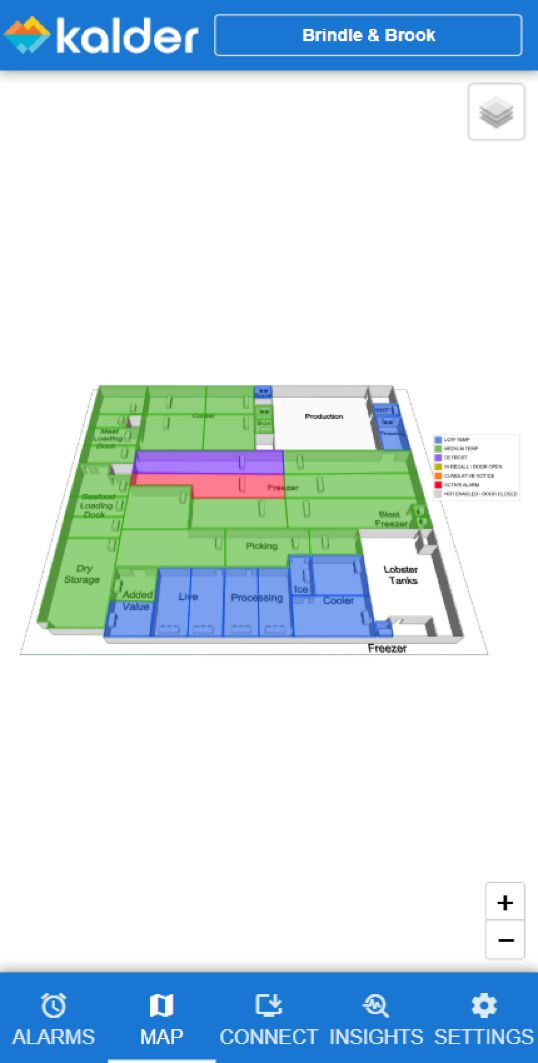
Review refrigeration alarms and their store context from a phone, on the way to the site.
The facility map shows connected equipment and its status in the store layout, so a technician new to the site walks straight to the right case.
Check temperature trends, implemented setpoints, high and low alarm limits and defrost recovery for supported equipment.
Reach supported controller views through your Kalder account, with the same store permissions as the desktop.
Store maps and technician views are set up per site. We confirm supported devices and your team’s access during the demo.
Refrigeration technicians, facilities managers and operations leads who need alarm and store information away from a desk.
No. Each user sees the stores assigned to their account. Technicians, contractors and managers can each have different access.
Yes. We will walk through alarms, the store map and remote access on the phones your team actually uses.
A 30-minute walkthrough with someone who knows refrigeration. Bring your store list and controller types; we’ll tell you what connects and where we’d start.